 AEIS
AEIS
Connected Delivery / ETABS Load Schedule
Column & Wall Load Scheduling
Discover loads from configured ETABS gravity and optional wind models, control mapping and factors in Load Mapping Studio, and generate a column and wall loading schedule workbook through the Windows worker.
- Best for
- Structural engineers and BIM coordinators preparing column and wall loading schedules from ETABS models.
- Outcome
- A generated column and wall loading schedule workbook linked to reviewed ETABS inputs, mappings, and run artifacts.
- Runs in
- Windows worker - ETABS and Access/ODBC integration
- Requirements
- Requires the AEIS local Windows worker and the configured external engineering application environment.
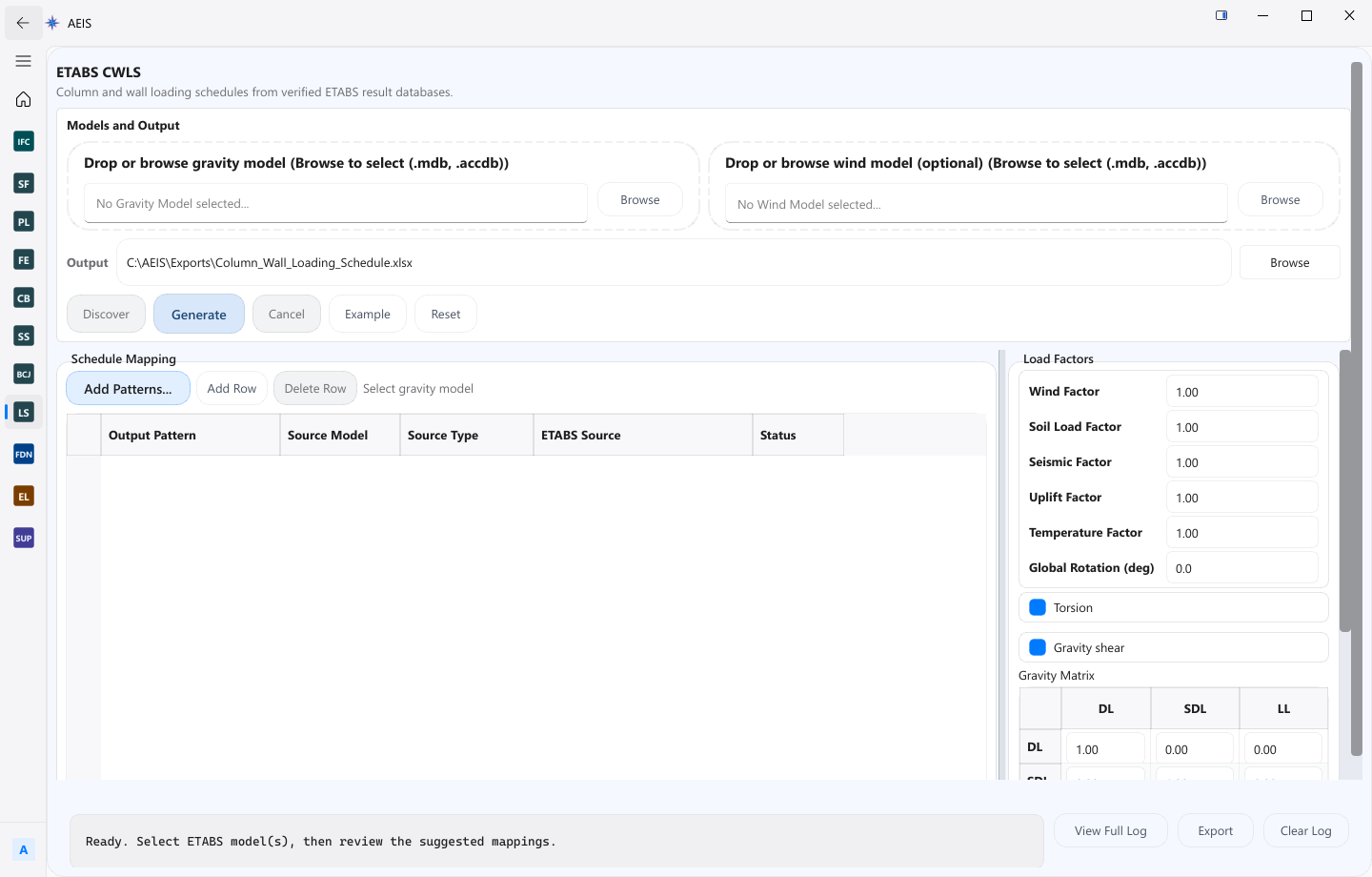
Evidence surface
Inspect the working evidence.
Review the product capture, then use the checklist for what a qualified engineer can verify before handoff.
- Gravity and optional wind model inputs
- Load Mapping Studio for factors and names
- Schedule workbook generation
- Worker-linked run artifacts
This product cannot execute in the browser alone. It depends on the Windows worker, configured ETABS and Access/ODBC environment, and engineer review of load names, factors, mappings, and schedule output.
Product details
Inputs, steps, and deliverables.
Generate column and wall loading schedules from reviewed ETABS models, factors, and mappings.
Inputs
- ETABS gravity model on the configured worker
- Optional ETABS wind model
- Load mapping profile and factors
- Engineer-reviewed load names and groupings
Steps
- Select ETABS models on the configured Windows worker
- Discover loads and open Load Mapping Studio
- Review factors, names, and mappings with the engineer
- Generate and inspect the schedule workbook and artifacts
Outputs
- Discovered load inputs from ETABS models
- Reviewed load mapping table
- Schedule workbook for columns and walls
- Run artifacts for the worker stage
Value and use
Why teams use Column & Wall Load Scheduling.
What this product is for in practice, and the engineering situations teams bring into AEIS first.
Value
- Discover loads from configured ETABS models on the worker
- Control mapping and factors before schedule generation
- Produce a workbook tied to the reviewed mapping state
Use cases
- Generate a CWLS from a gravity ETABS model
- Include optional wind model loads in the mapping
- Standardize load factors across a tower schedule
- Re-run the schedule after mapping corrections
FAQ
Before you evaluate this product.
Common questions about Column & Wall Load Scheduling, execution requirements, and engineer responsibility.
Can this run in the browser alone?
No. ETABS Load Schedule requires the AEIS local Windows worker and a configured ETABS and Access/ODBC environment.
What does the engineer review?
Load names, factors, mappings, and the generated schedule output. AEIS does not replace engineer acceptance of the schedule.
Are wind models required?
No. A gravity model is required; a wind model is optional when the project needs those loads in the schedule.
Evaluate Column & Wall Load Scheduling on your engineering case.
Describe the column & wall load scheduling inputs and required deliverable. AEIS will confirm product fit, execution requirements, and the engineer-owned acceptance point.