 AEIS
AEIS
Connected Delivery / Superstructure Design
Superstructure Analysis & Design
Connect IFC superstructure build data, ETABS runs on the Windows worker, C13 design, tower and story definitions, result databases, and reports into one delivery record from BIM source to design deliverable.
- Best for
- Structural engineers coordinating IFC build data, ETABS analysis, C13 design, and reports.
- Outcome
- A connected superstructure record spanning IFC build artifacts, ETABS results, C13 checks, result databases, and reports.
- Runs in
- Browser workspace + Windows worker - ETABS required for run stage
- Requirements
- Build and design use the AEIS worker; ETABS execution requires the configured licensed desktop environment.
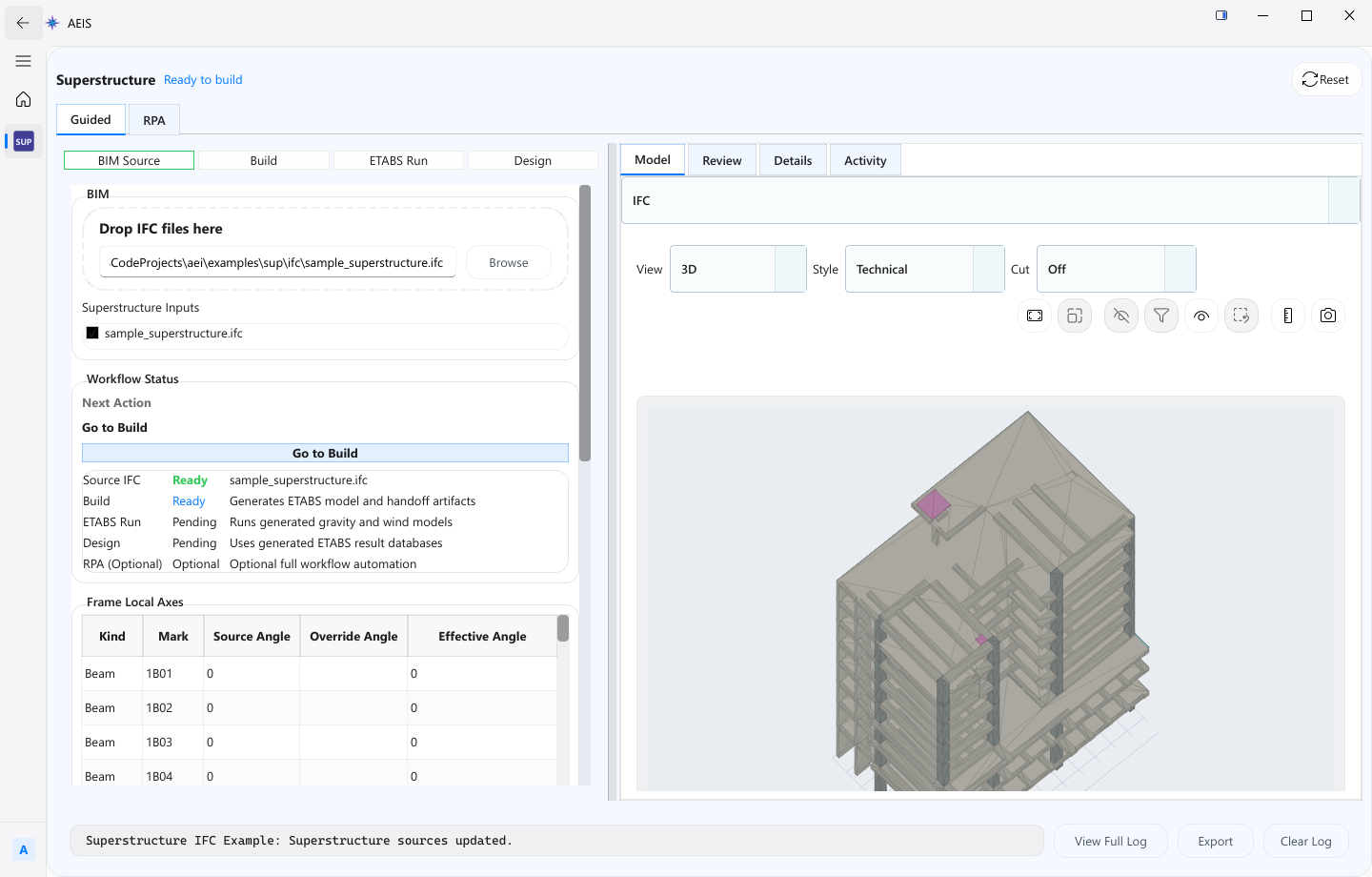
Evidence surface
Inspect the working evidence.
Review the product capture, then use the checklist for what a qualified engineer can verify before handoff.
- IFC Build for superstructure geometry
- ETABS Run on the licensed Windows worker
- C13 design checks and outputs
- Reports and result databases linked to the run
ETABS execution cannot run in the browser alone and depends on the licensed worker environment; source models, analysis settings, extracted results, C13 checks, and final design remain engineer-reviewed.
Product details
Inputs, steps, and deliverables.
Connect IFC superstructure inputs, ETABS execution, C13 design, result data, and reports.
Inputs
- IFC superstructure source
- Tower and story definitions
- Run and design configuration
- ETABS stage settings on the licensed worker
Steps
- Build superstructure inputs from the IFC source
- Define tower, story, run, and design configuration
- Run the ETABS stage on the licensed Windows worker
- Review C13 design outputs, result databases, and reports
Outputs
- ETABS model and result data
- C13 design outputs
- Reports and result databases
- Build and run artifacts on one record
Value and use
Why teams use Superstructure Analysis & Design.
What this product is for in practice, and the engineering situations teams bring into AEIS first.
Value
- Build superstructure inputs from IFC with tower and story definitions
- Run ETABS on a licensed Windows worker with attached state
- Keep C13 design, reports, and result databases on one record
Use cases
- Build a multi-tower IFC superstructure for analysis
- Run ETABS for a configured design stage
- Review C13 design outputs after extraction
- Issue reports and result databases tied to the producing run
FAQ
Before you evaluate this product.
Common questions about Superstructure Analysis & Design, execution requirements, and engineer responsibility.
Can ETABS run in the browser?
No. ETABS execution requires the configured licensed desktop environment through the AEIS Windows worker. AEIS coordinates IFC build, C13 design, and reports around that stage.
What is C13 in this product?
C13 design is the implemented design stage that consumes extracted ETABS results within the superstructure delivery record. Final design acceptance remains with the engineer.
What must the engineer still review?
Source models, analysis settings, extracted results, C13 checks, and final design remain engineer-reviewed.
Evaluate Superstructure Analysis & Design on your engineering case.
Describe the superstructure analysis & design inputs and required deliverable. AEIS will confirm product fit, execution requirements, and the engineer-owned acceptance point.