 AEIS
AEIS
Browser Design / Steel Design
Steel Member Design
Check structural steel members for classification, design factors, validation, result tables, and export state under the implemented HKCOP steel scope.
- Best for
- Structural engineers checking steel members against the implemented HKCOP scope.
- Outcome
- A traceable member check with classification, governing utilization, result tables, and export state.
- Runs in
- Browser workspace - cloud-ready
- Requirements
- Runs through the AEIS technical design API using the supported HKCOP steel scope.
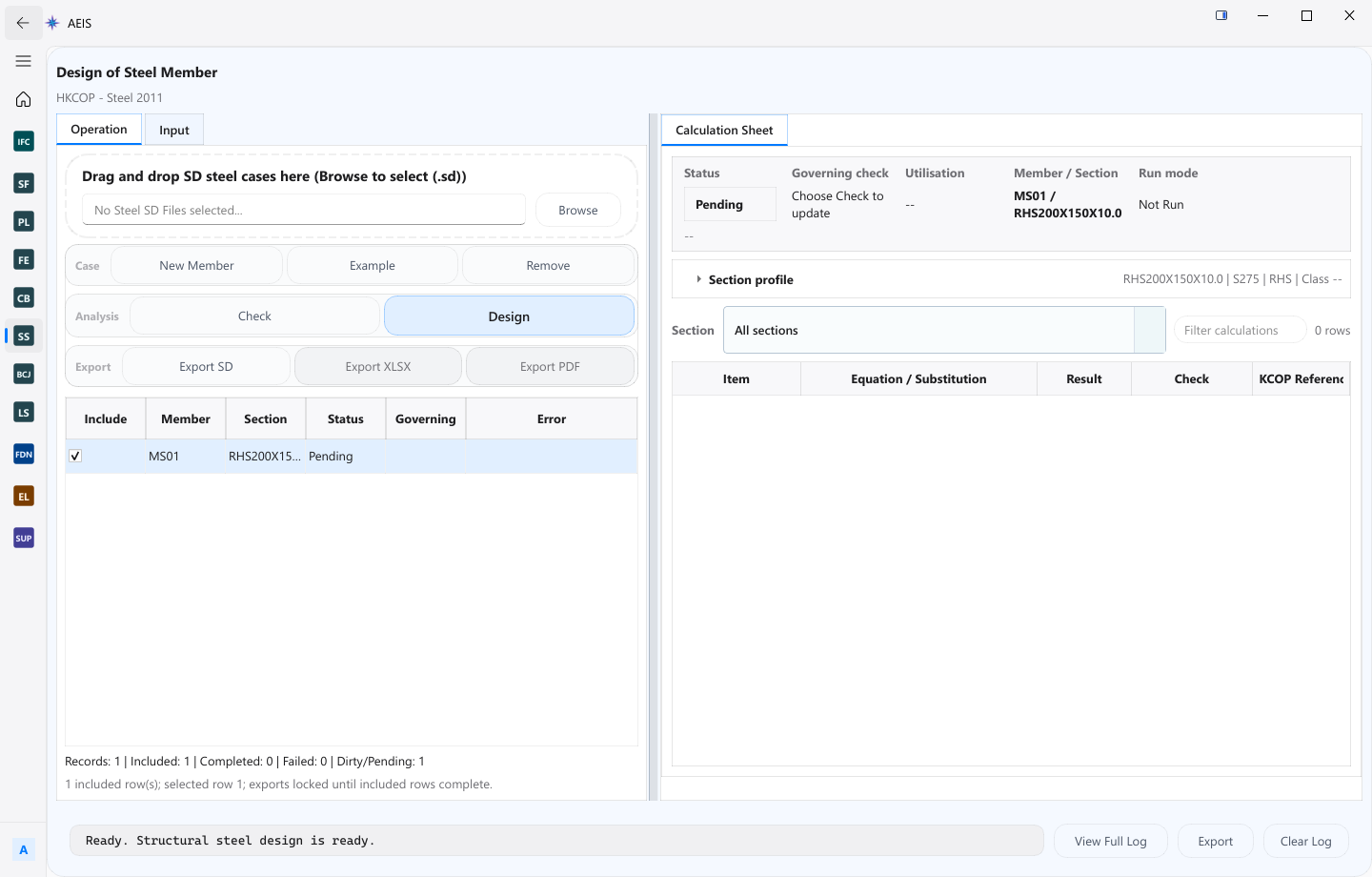
Evidence surface
Inspect the working evidence.
Review the product capture, then use the checklist for what a qualified engineer can verify before handoff.
- Scoped HKCOP steel checks
- Member classification
- Governing utilization tables
- Export state for the case
The module does not replace connection, global stability, fire, fatigue, or other checks outside the visible implemented scope; final acceptance remains with the engineer.
Product details
Inputs, steps, and deliverables.
Check steel members with scoped HKCOP rules, visible classification, utilization, and exports.
Inputs
- Member section and length
- Material and design factors
- Forces and check settings
- Validation inputs for the supported steel scope
Steps
- Define member section, length, and material
- Enter forces and design factors
- Validate inputs and run scoped checks
- Inspect classification, utilization, tables, and exports
Outputs
- Member classification results
- Governing design utilization
- Result tables for the check set
- Export state for design evidence
Value and use
Why teams use Steel Member Design.
What this product is for in practice, and the engineering situations teams bring into AEIS first.
Value
- Apply scoped HKCOP steel checks with visible classification
- Inspect governing utilization in result tables
- Keep export state aligned with the checked case
Use cases
- Check a beam or column member against design forces
- Review classification before accepting utilization
- Export member check tables for design records
- Validate design factors before a batch of member checks
FAQ
Before you evaluate this product.
Common questions about Steel Member Design, execution requirements, and engineer responsibility.
Which code scope does Steel Design implement?
The module implements the visible HKCOP steel scope. Connection, global stability, fire, fatigue, and other topics outside that scope are not claimed.
Does this cover connections?
No. Connection design and other out-of-scope topics remain outside the module; final acceptance stays with the engineer.
Where does it run?
In the AEIS browser technical workspace through the technical design API — no Windows worker required for member checks alone.
Evaluate Steel Member Design on your engineering case.
Describe the steel member design inputs and required deliverable. AEIS will confirm product fit, execution requirements, and the engineer-owned acceptance point.