 AEIS
AEIS
Browser Design / Subframe
Subframe Analysis & Design
Develop editable subframe cases with input tables, analysis diagrams, design checks, and controlled exports in one browser product with visible assumptions and results.
- Best for
- Structural engineers developing and reviewing editable subframe cases.
- Outcome
- A reviewable subframe case with analysis diagrams, design results, and controlled JSON, C01, XLSX, and report exports.
- Runs in
- Browser workspace - cloud-ready
- Requirements
- Runs in the AEIS technical workspace using the Python analysis and design service.
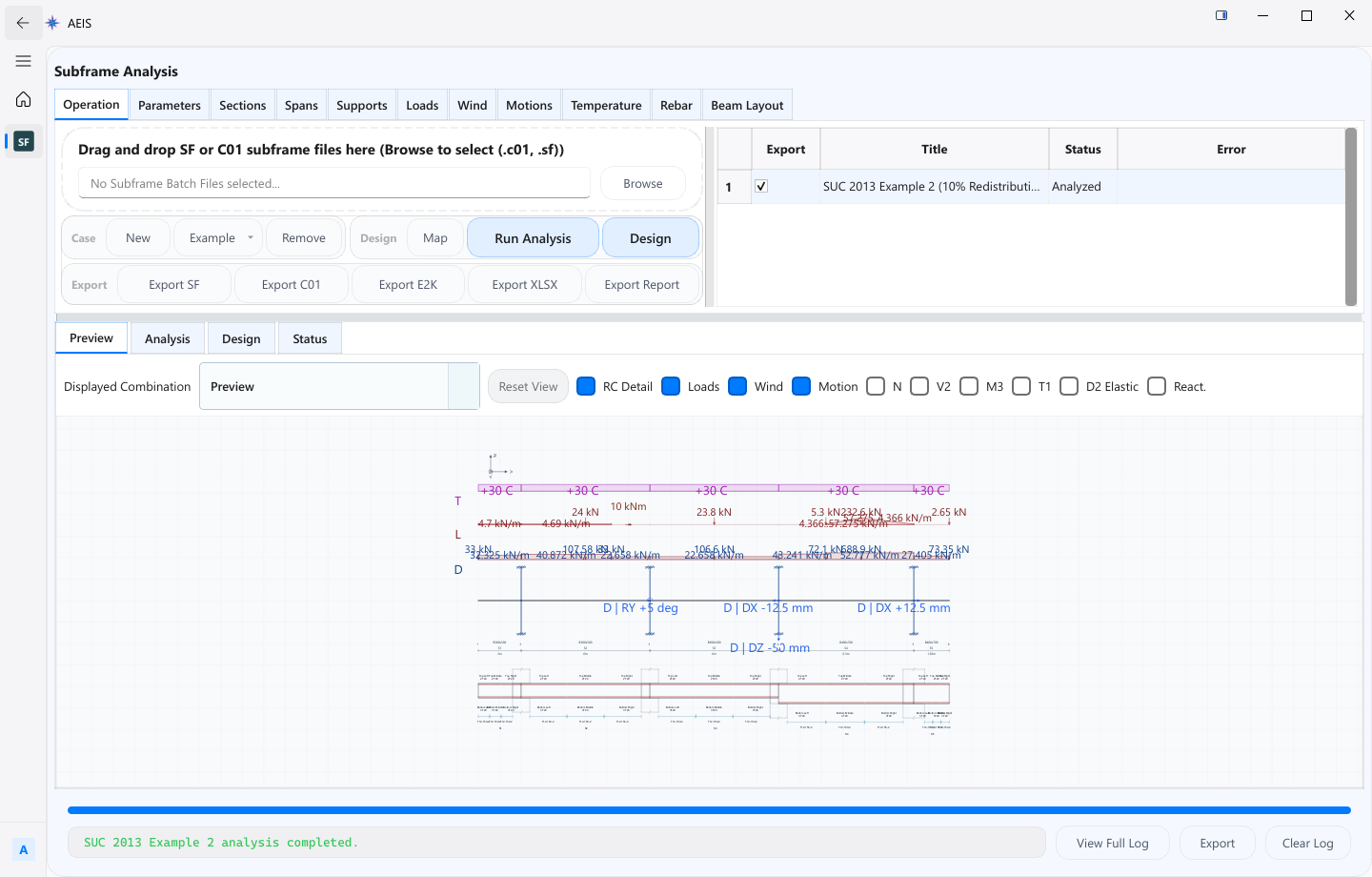
Evidence surface
Inspect the working evidence.
Review the product capture, then use the checklist for what a qualified engineer can verify before handoff.
- Editable input tables
- Analysis diagrams tied to the case
- Design results in scoped tabs
- Controlled multi-format exports
Results cover the implemented analysis and design scope; engineers remain responsible for modelling assumptions, load cases, and final acceptance.
Product details
Inputs, steps, and deliverables.
Develop editable subframe cases with visible analysis, design results, and controlled exports.
Inputs
- Structural geometry for the subframe case
- Load cases and combinations
- Material and design parameters
- Editable input tables for case definition
Steps
- Define structural geometry and load cases
- Set material and design parameters in input tables
- Run analysis and inspect diagrams
- Review design results and export artifacts
Outputs
- Analysis diagrams for the defined case
- Design results tied to the case
- JSON, C01, XLSX, and report exports
- Case state suitable for engineer acceptance
Value and use
Why teams use Subframe Analysis & Design.
What this product is for in practice, and the engineering situations teams bring into AEIS first.
Value
- Keep geometry, loads, analysis, and design in one editable case
- Inspect diagrams and design tabs before export
- Export controlled artifacts from the reviewed case
Use cases
- Develop a typical floor subframe with load combinations
- Iterate member design after load case changes
- Export case results for internal design records
- Compare batch-style case variants before final acceptance
FAQ
Before you evaluate this product.
Common questions about Subframe Analysis & Design, execution requirements, and engineer responsibility.
Does Subframe require SAFE or ETABS?
No. Subframe runs through AEIS browser analysis and design services. Licensed Windows tools are used by separate Connected Delivery products.
What exports are available?
Supported exports include JSON, C01, XLSX, and report formats from the controlled export path for the case.
Who accepts the design?
The engineer. Modelling assumptions, load cases, and final acceptance remain outside the automated result set.
Evaluate Subframe Analysis & Design on your engineering case.
Describe the subframe analysis & design inputs and required deliverable. AEIS will confirm product fit, execution requirements, and the engineer-owned acceptance point.